2014 was a great year for First Impressions Video and I want to extend my heartfelt thanks to the clients that are also my friends. I value you and welcome the opportunity to serve in 2015.
Got video? Need video?
Warmest regards,
Terry
2014 was a great year for First Impressions Video and I want to extend my heartfelt thanks to the clients that are also my friends. I value you and welcome the opportunity to serve in 2015.
Got video? Need video?
Warmest regards,
Terry
Videology posted a cool looking infographic about the incredible innovation in television development. Television and video share this evolution!

Attribution: Videology, eMarketer, Nielsen
Here is another of those really cool infographics that affirm the importance of video for your business. Got video?

Attribution: Content Marketing Institute & Eloqua
When you run a small business, you wear a LOT of hats! One of the things that must be done in contemporary business is to ensure that your business can be found when people are searching online for the product or service you offer. So imagine my elation to discover this today, when doing a search for “video production”
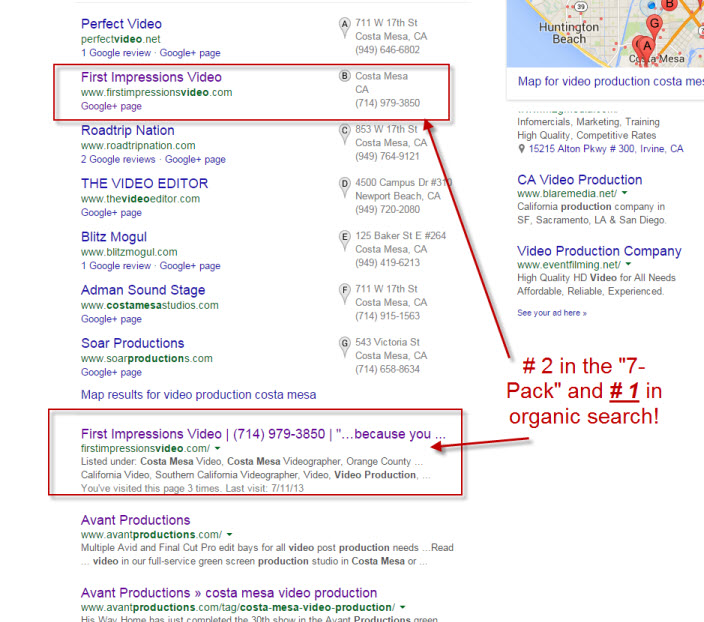
Search engine optimization (SEO) is an ongoing activity and many business owners use outside agencies to help get these kinds of results. I am fortunate to have spent the last decade in digital marketing before launching First Impressions Video. SEO is also very fluid and tomorrow my rankings can change–good or bad. But after working at this for quite a while, it’s nice to see Google “smiling at my website” today! Full disclosure: there were three listings that preceded First Impressions Video in the search results, but one was a generic Yelp listing with no specific company cited; the second was for Costa Mesa Television, which is not a video production business and the third was a directory page of the “top 15 video production services in Costa Mesa.” None of those was a stand-alone business.
Got video?

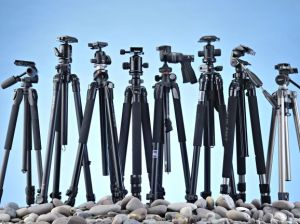
This post is dedicated to people that choose to shoot their own video. On occasion, I have been asked to take on editing assignments where, in order to save cost, a client has provided video footage they’ve captured. Nothing can be more disappointing to any editor than to find hours of footage that is barely usable because of poor camera technique, including pans, tilts, zooms and rack focus, that are caused primarily due to an unstable base from which to shoot. And while I too have watched “Modern Family” and “The Office” which popularized the “mockumentary” style of cinematography, with “whip pans” and “snap zooms,” I would argue that stable videos with smooth movements are far less jarring to the eyes. For the do-it-yourselfer, there is a simple solution: a sturdy tripod!
Tripods have been around since cameras were the weight of a Volkswagen—and almost as big, and you needed a very strong platform to support them. Now, cameras are super small and we’ve all seen them integrated into today’s smartphones and even watches. Are tripods going the way of the dodo as a result? No!
Think about this: Say you’re watching your son or daughter singing in the school choir and you’re in your seat 50 rows away from the stage trying to capture the proud moment when your child steps forward for a solo. You’ve got your Galaxy or iPhone zoomed all the way out and now your body starts to shake from fatigue in the hands and arms. You get home to see what you captured, only to discover a blurry mess because you weren’t able to keep the device steady. Bummer!! And don’t be fooled by the claims of the device’s manufacturer about “image stabilization.” At high zoom settings, any body movement will be amplified, so give yourself the best chance of getting the shot right, and use a tripod.
Tripods come in many shapes, sizes and price points, but to not use one is to invite disappointment. At the very least, get one with strong legs and a “fluid head” so that camera movement is as smooth as possible. Also make sure the tripod’s head can lock. Nothing will cause more panic than being 10 feet away from your camera when it topples over because the head wasn’t locked and the whole rig became unbalanced. The good news is that tripods can accommodate most any camera made today, including the aforementioned smartphones and watches.
The takeaway: Make the investment in a good tripod…your videos will be much better because of it!
As a videographer, I have watched changes in equipment happening at a dizzyingly rapid rate over the years. SD to HD to 3D to 4K…DSLRs, GoPros, drones and other pieces of equipment and these transitions have taken place just in the last few years!! What’s a person to do?!? One thing’s for sure: You could go (and stay) broke trying to keep up! Besides, you might have the latest and greatest “gizmatchit” but in the end, it still comes down to the creative skill you possess when you look through the viewfinder. And regardless of the gear I use (I do confess to having all HD equipment nowadays!) my clients hire me because I am able to interpret their requests and deliver a finished product that we are both happy with.
One of the things that has occurred in all this change is the type of delivery medium being used. For years—if not decades, the delivery medium of choice has been the ubiquitous DVD. Now even that little plastic platter is facing potential extinction as consumers are asking for their deliverables in formats other than DVD. Even Adobe with their incredible “Creative Cloud” series of applications is unbundling and discontinuing Encore—their DVD authoring program—from their editing app, Premiere Pro.

The fact is that there are a number of options available and since it is my job to deliver in a manner and medium desired by the client, I am very open to these alternatives. As the cost of storage media continues to drop and with the advent of “cloud-based” storage, I can get your finished product to you pretty much any way you want. Here are just a few examples, keeping in mind that you still must have an application that will play the video file (with the exception of sharing or streaming services that have playing capability built-in):
According to industry website Doddle, wedding and event videographers, and even attorneys (for depositions and other types of legal videography) still desire—and sometimes require—DVDs. That said, I have used every one of the alternatives listed in the bullet points, except live streaming. As the price of that technology continues to come down, I can see adding it to my repertoire.
So here’s the question: How would you like your video delivered? I’d love to hear your thoughts! Drop me a note at info@firstimpressionsvideo.com,
A year ago, I lost my job in internet marketing. Rather than continue in that field, I took a risk and with the blessings of a supportive spouse, started First Impressions Video. After all, if not now…when? It’s been an interesting journey and have worked on a myriad of interesting projects. And while there could have been more jobs, every starting entrepreneur says the same thing. That said, I convey thanks to every customer who entrusted their projects to me, and thanks to Laurie Probasco Wall, for believing in me! And here’s to an even more prosperous year 2!!!

It goes without saying that your business website(s) should include video, but you may be stuck on what kind of video to produce. Here are some “thought starters.”
Step #1: Who is your target audience?
You don’t write your website content for everyone – you write for a specific, targeted audience. In the same way, you don’t want to make video for everyone. Start by defining the specific audience you need your video to connect with.
Step #2: What’s your message?
Each of your videos should have a single message. On the pages your visitors land on first, you may need a video that outlines ‘what the product or service is,’ or ‘we are experts at what we do’ or ‘three ways our product/service saves you money.’ On pages people land on next, you might want to establish credibility. Testimonial case studies are ideal for creating credibility because they let your prospects look at your product through the eyes of a satisfied customer.
Another way to create credibility is to videotape a seminar or presentation, and then break it up into short chunks that demonstrate your expertise. In most cases you won’t want to post the whole seminar, because your website visitors expect short, pertinent videos.
Is it important for your website visitors to understand that your company is passionate about excellent customer service? A video featuring the people who will provide that service can do that for you. Are product details important? Create brief product demo videos.
Step #3: Where is your target audience?
Video is sticky – it keeps people on your website when they otherwise might “bounce” before they have a chance to understand if you’re a good match for them. It’s a very good idea to use video where people first enter your site, to keep them engaged.
It’s also important NOT to tuck the rest of your videos out of the way, where they’ll be difficult to find. Place them on the pages that are most visited, or relevant to the content of a specific page, to give the largest number of visitors the opportunity to watch them.
Step #4 Spread Your Videos Around
Even though you may be creating videos specifically for your website, you’ll be missing a big opportunity if you ONLY use them on your website.
Video is the most effective tool you have for engaging your prospects and customers. These steps should get you thinking about how your company can leverage video to engage your prospects and customers on your website, and elsewhere on the web.

Proud to be a member of this prestigious organization
 First Impressions Video